
Scammers send emails that look like they’re from your email provider or control panel – often using names like cPanel, Webmail or Mail Administrator. They try to frighten you into clicking a link and entering your email password on a fake login page. Once they have it, they can read your email, send spam from your address, or use it to get into your other accounts.
What these emails look like
Here’s a real example one of our customers received, with their details replaced. The numbers show the warning signs.
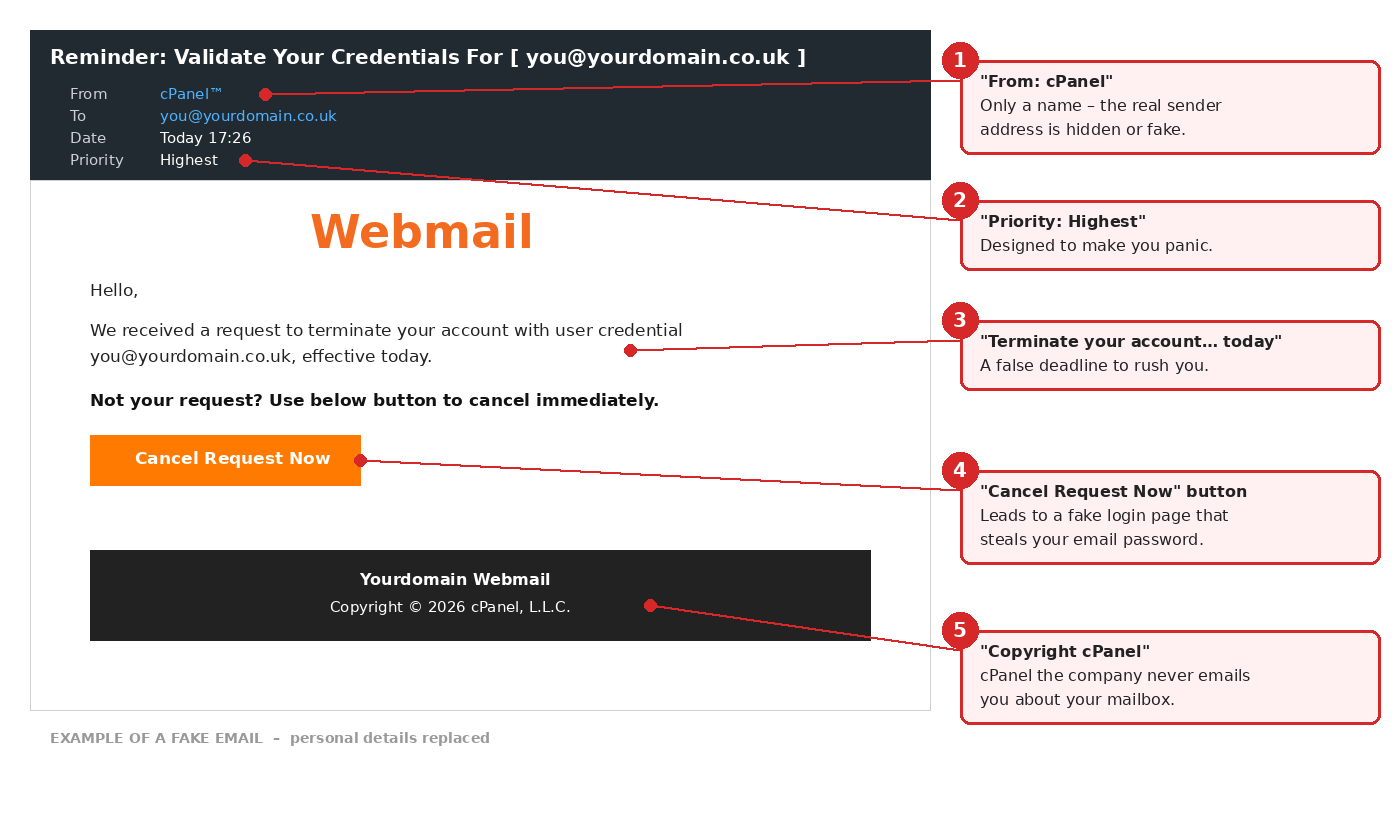
| # | Warning sign | Why it’s a giveaway |
|---|---|---|
| 1 | From: “cPanel” | Only a name is shown. Check the actual email address it came from – it won’t be one of ours. |
| 2 | Priority: Highest | Marked urgent to make you panic and act without thinking. |
| 3 | “Terminate your account… effective today” | A false deadline. Nobody can close your account just by asking, and we’d never do it by email. |
| 4 | A big button to “cancel” or “verify” | It takes you to a fake login page that steals your password. |
| 5 | “Copyright cPanel” | cPanel makes control panel software. It doesn’t email you about your mailbox. |
How to tell it’s fake
- Genuine emails from us only come from addresses ending in @pacwebhosting.uk.
- We never ask you to “verify”, “validate” or “confirm” your email password by clicking a link.
- We never close or suspend an email account because of a single email, and anything important about your account also appears in your client area.
- Other common variations: “your mailbox is full”, “messages are on hold”, “your password expires today” or “unusual sign-in detected”. All of them want you to click and log in.
What to do with the email
- Don’t click any links or buttons, and don’t reply.
- Delete it, or mark it as spam or phishing in your email app.
- Report it to the National Cyber Security Centre by forwarding it to [email protected]. It’s free, and helps get scam websites taken down.
- Not sure? open a support ticket or call us on 0333 123 8000 and we’ll tell you whether it’s genuine.
Already clicked and entered your password?
- Change your email password now. Use a new, strong password you haven’t used anywhere else – see reset email account password.
- Update the password on your phone and computer, so your email apps keep working.
- Change the password anywhere else you’ve used the same one.
- Check your email settings for anything you didn’t set up, such as forwarding to an unknown address, or an out of office reply – see how to forward email to another address.
- Tell us, so we can check your account for anything unusual, such as spam being sent from it.
For more on spotting scams, see how to spot a phishing email pretending to be from PAC.
